v0.4.0 · open source · MIT · new: agent mission control

The AI-native terminal that understands your screen.

Native and fast like Ghostty. Blocks and AI like Warp. But local-first, bring-your-own-key, no account — and with a cyberpunk soul. Rift is a terminal emulator written in Rust.

macOS first · Linux builds · Support on Ko‑fi

❯ # find the 10 largest files

✦ generated from # — review, then Enter to run

❯ du -ah . | sort -rh | head -n 10

812M ./target

604M ./target/release

9.4M ./recordings

…

✓ 00.42s

❯ cargo build

error[E0432]: unresolved import serde

 --> src/config/mod.rs:3:5

✗ 1013.1s

⚡ Fix cargo add serde --features derive Tab accept · Esc dismiss

❯

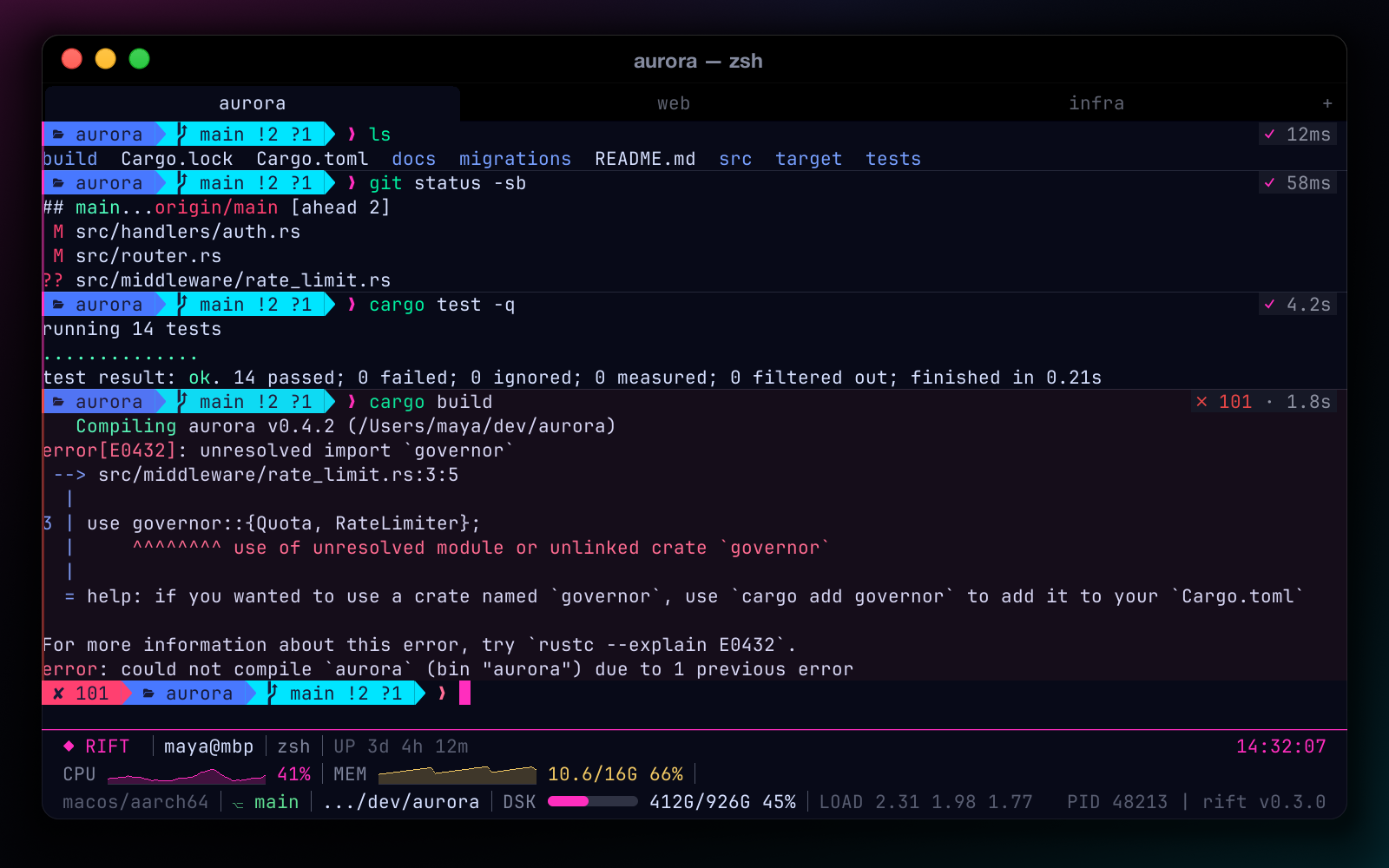
A natural-language comment “# find the 10 largest files” becomes a du/sort command; its block finishes with a green exit-0 chip. A failed cargo build block shows exit 101 and an inline “Fix” suggestion that Tab accepts.

Why Rift

  • 01 Native & fast

    Pure Rust, GPU-optional rendering with damage tracking — a keystroke frame dropped from ~42 ms to ~6 ms. IME, CJK and Nerd Font fallback built in.

  • 02 Understands your screen

    Shell integration turns output into command blocks. AI gets the selection, the block or the screen as context — and never runs anything without you.

  • 03 Yours, locally

    No account, no telemetry. Bring your own key (DeepSeek, OpenAI-compatible) or run fully offline with Ollama.

// features

A terminal that knows where each command starts and ends.

Command blocks

Every command and its output become a block, powered by OSC 133 hooks that Rift injects into zsh, bash and fish automatically — your rc files are never touched.

  • Exit-code gutter plus duration and exit chips
  • Hover toolbar: copy command, copy output, ask AI, rerun, fold
  • Fold long output; jump between blocks with ⌘⇧↑ / ⌘⇧↓
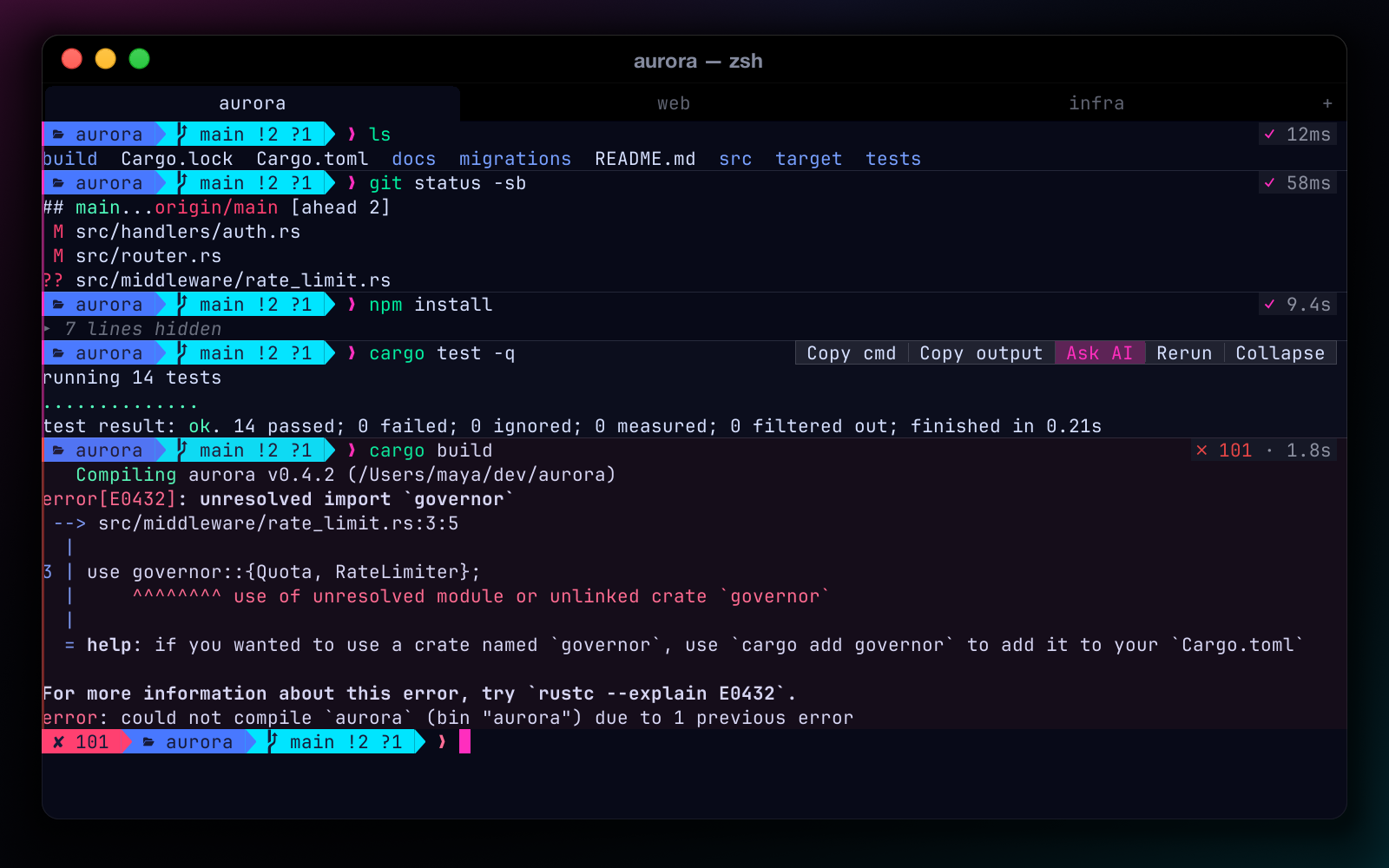
Command blocks in Rift: a green gutter for successful commands, a red one for a failed command, duration and exit-code chips, and a hover toolbar with copy, ask AI, rerun and fold buttons

AI chat, docked preview

A streaming chat sidebar that lives beside your panes, not in a browser tab. Works with any OpenAI-compatible API (DeepSeek, OpenAI…) or a local Ollama model.

  • Toggle with ⌘⇧A
  • Markdown answers with CJK-aware wrapping
  • Suggested commands are inserted, never auto-executed
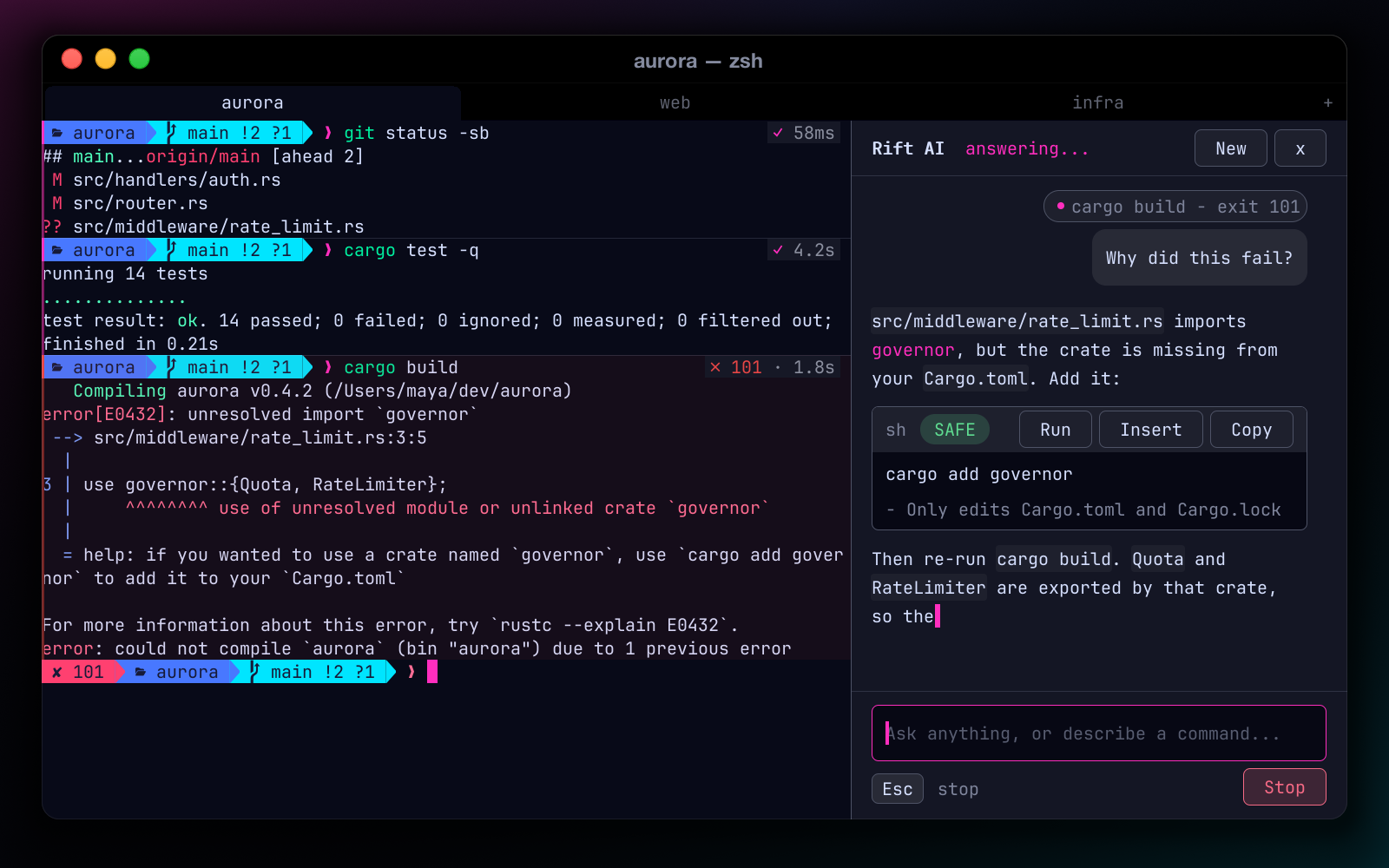
The AI chat sidebar docked to the right of the terminal, streaming an answer about a build error
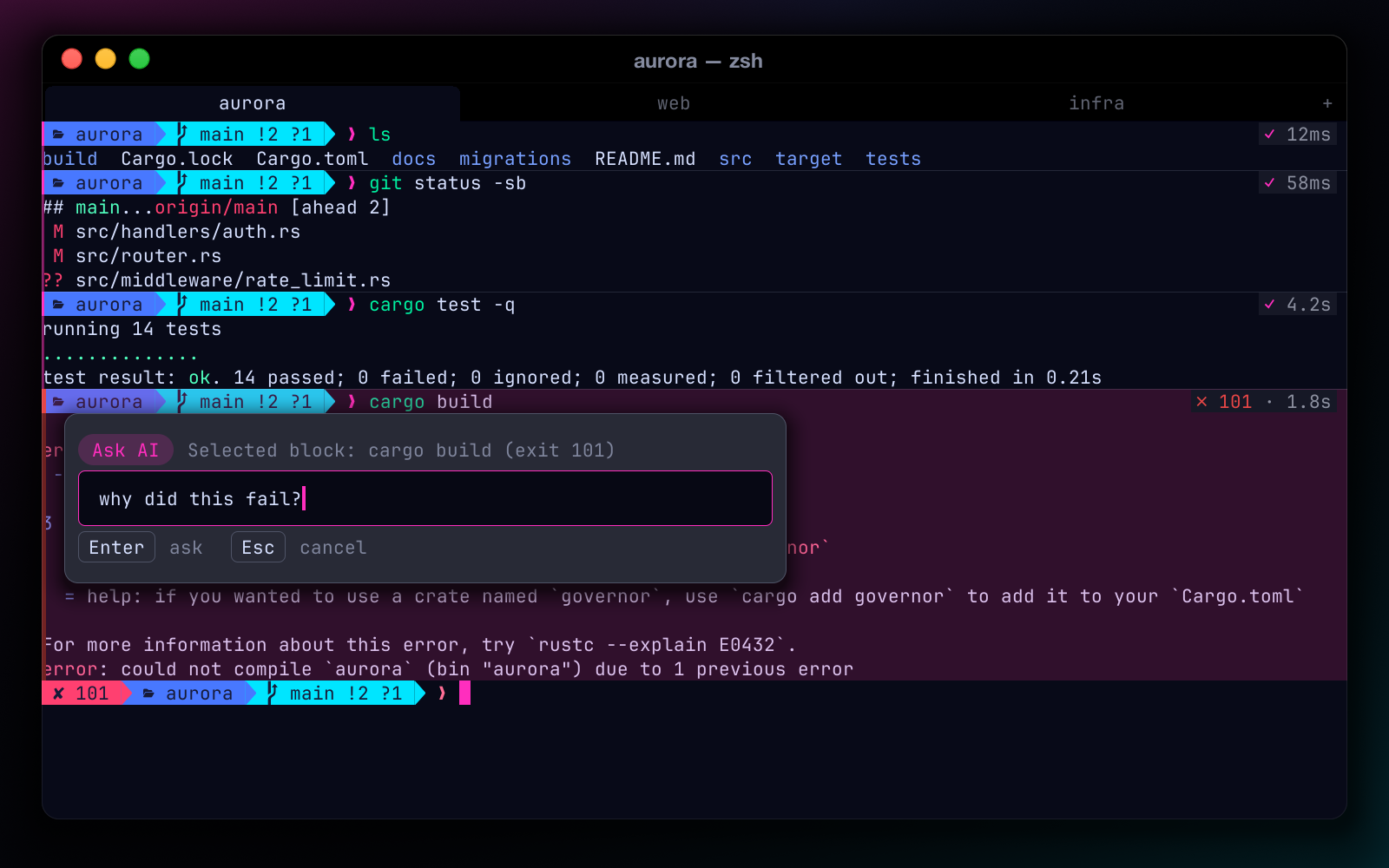
Cmd+K popover anchored to a selected command block, asking the AI what the output means

⌘K Ask about this preview

A popover anchored to whatever “this” is: your selection, the hovered block, the last block or the whole screen.

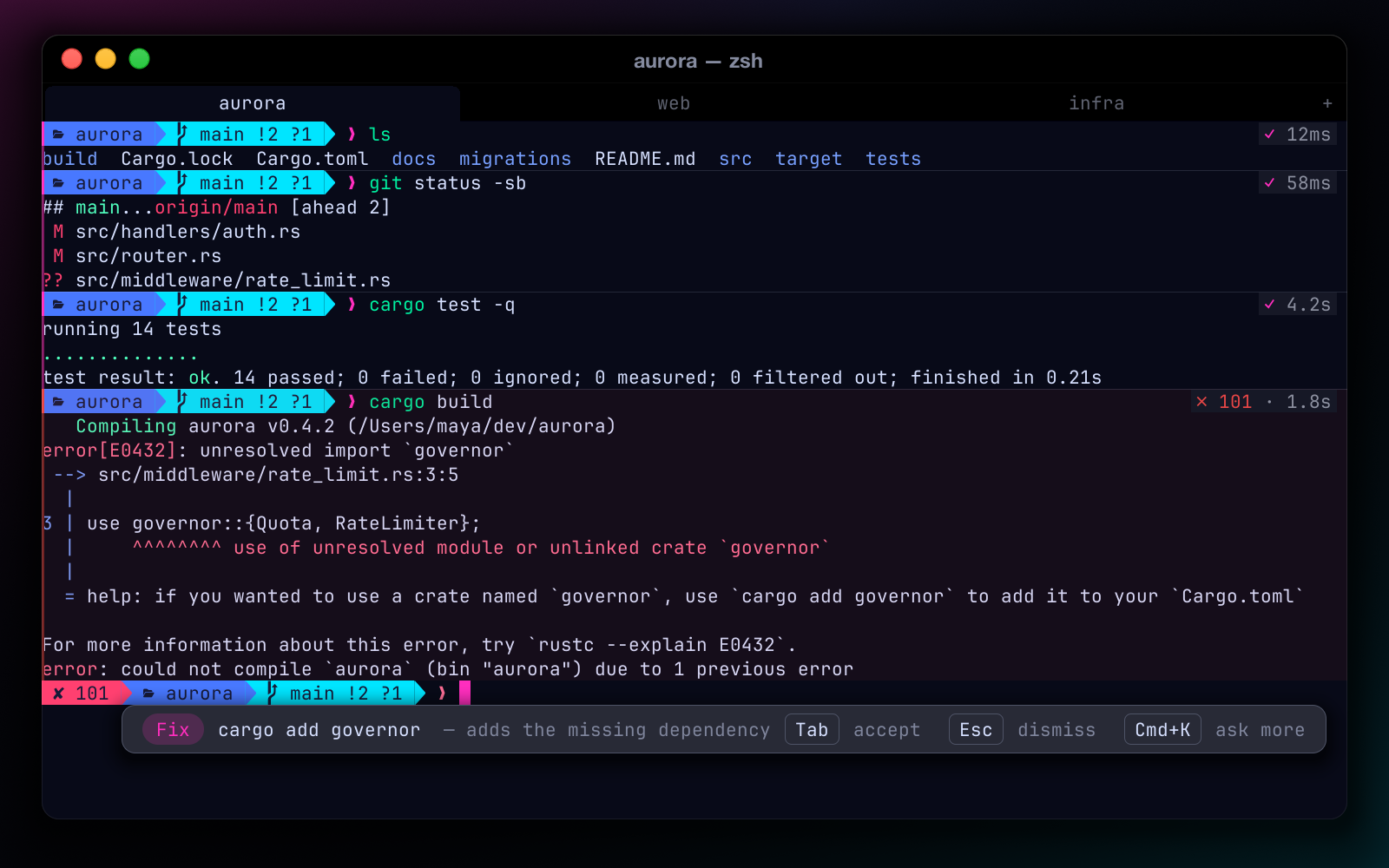
A failed cargo build block with an inline fix suggestion bar below it reading Tab to accept

Inline fixes preview

When a command fails, Rift proposes a corrected one right at the prompt. Tab accepts, Esc dismisses.

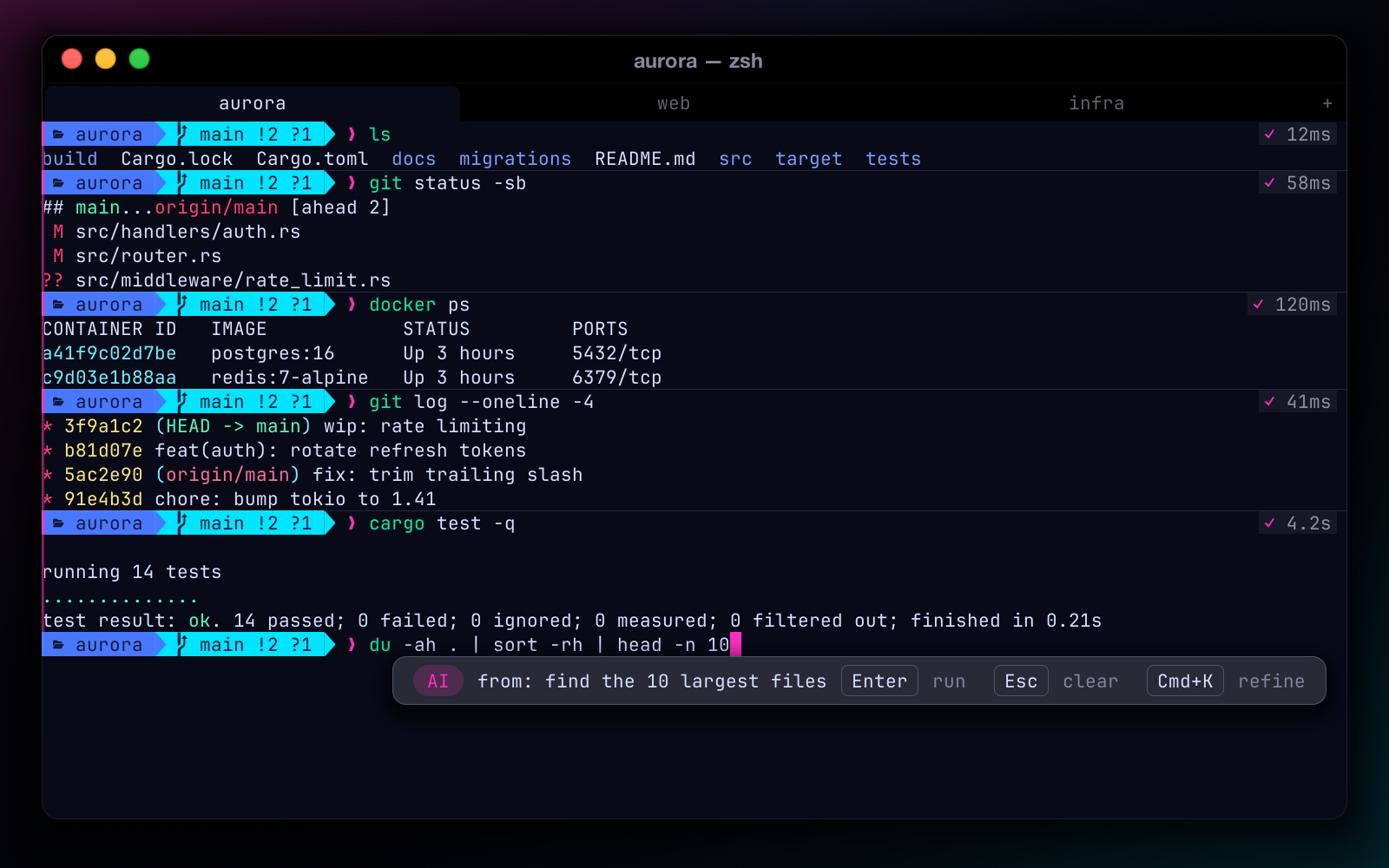
Typing # find the 10 largest files at the prompt and getting a generated du and sort command back

# natural language preview

Type # what you want and press Enter. The line becomes a real command, typed back into your prompt for review.

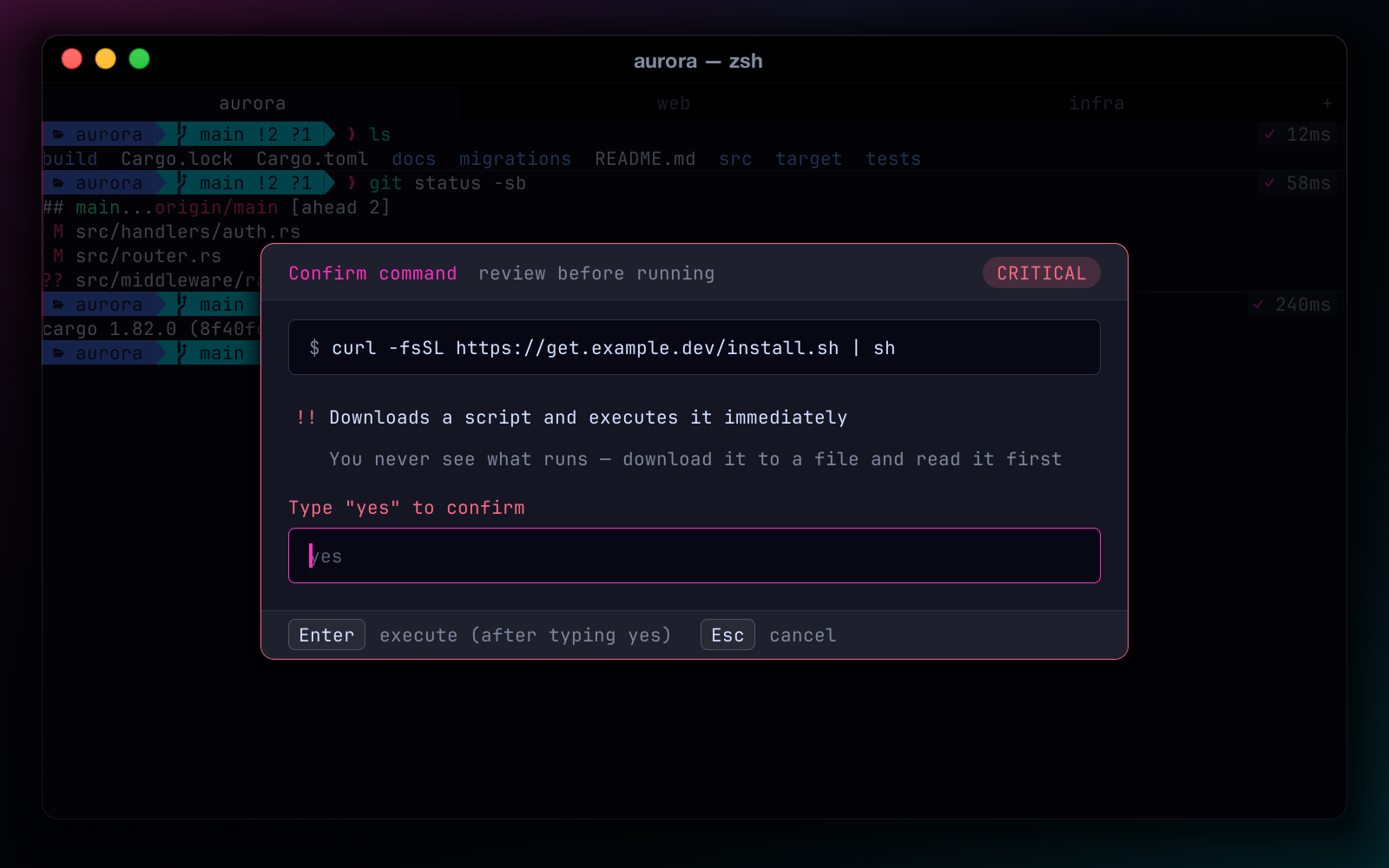
Preview-Then-Accept modal flagging curl piped into sh as critical, requiring a typed yes

Preview-Then-Accept

rm -rf on important paths, curl | sh, git reset --hard, force pushes and friends are intercepted before they run, with a real impact analysis. Critical ones need a typed “yes”.

More AI, all optional

  • Advisor — a second-opinion risk review of suggested commands
  • Teaching mode — explains a command on demand, before you run it
  • Observer — local-only workflow insights, opt-in, never records arguments

Splits, tabs & windows

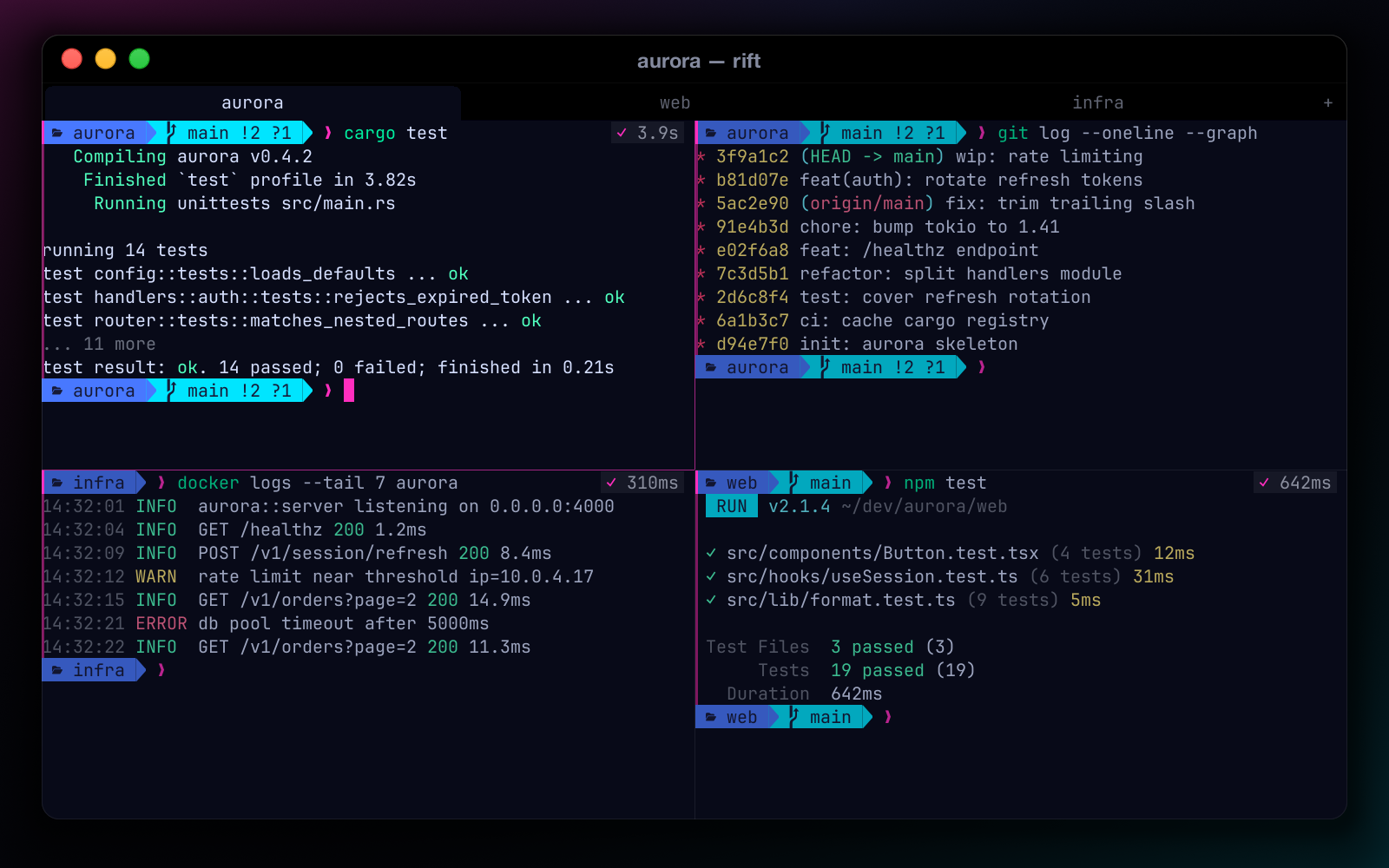
Recursive splits with geometric focus, zoom, equalize, swap and drag-resize. Tabs rename and reorder. Open as many windows as you like — each has its own tabs, panes and docks. Quit and come back to every window, with the same tabs, split layouts, working directories and positions.

  • ⌘D split right · ⌘⇧D split down · ⌘⇧↩ zoom
  • ⌥⌘+arrows to move focus by geometry
  • ⌘N new window, opened in the focused pane's directory
  • Session restore: all windows, tabs, layouts, cwd
Rift with four split panes in two tabs, the focused pane highlighted with a magenta border
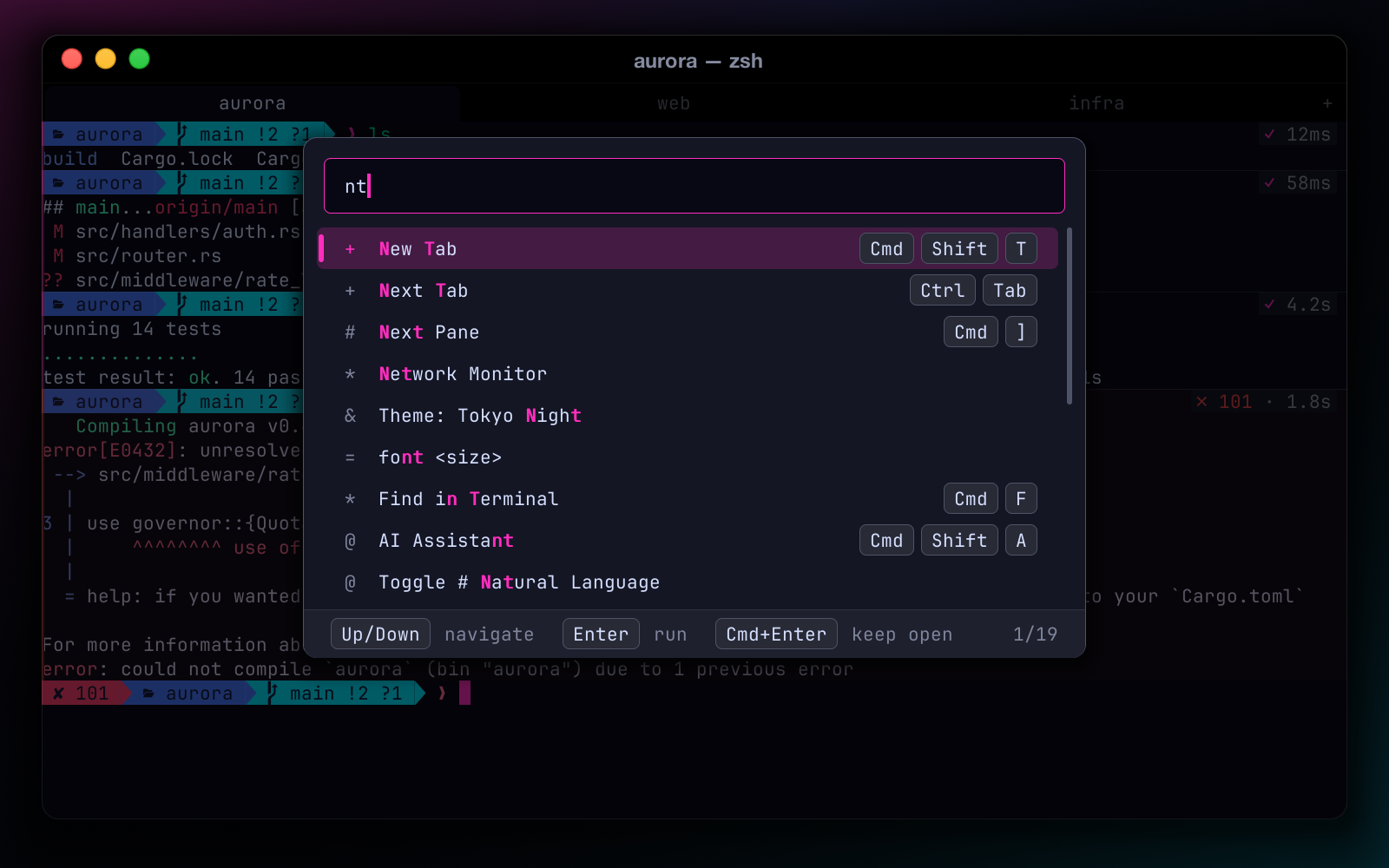
Command palette with fuzzy matches grouped by category and a Recent section on top

⌘P Command palette

Fuzzy search with frecency ranking, plus parameterized commands: theme, font, open, ssh, cd, > shell, ? ask.

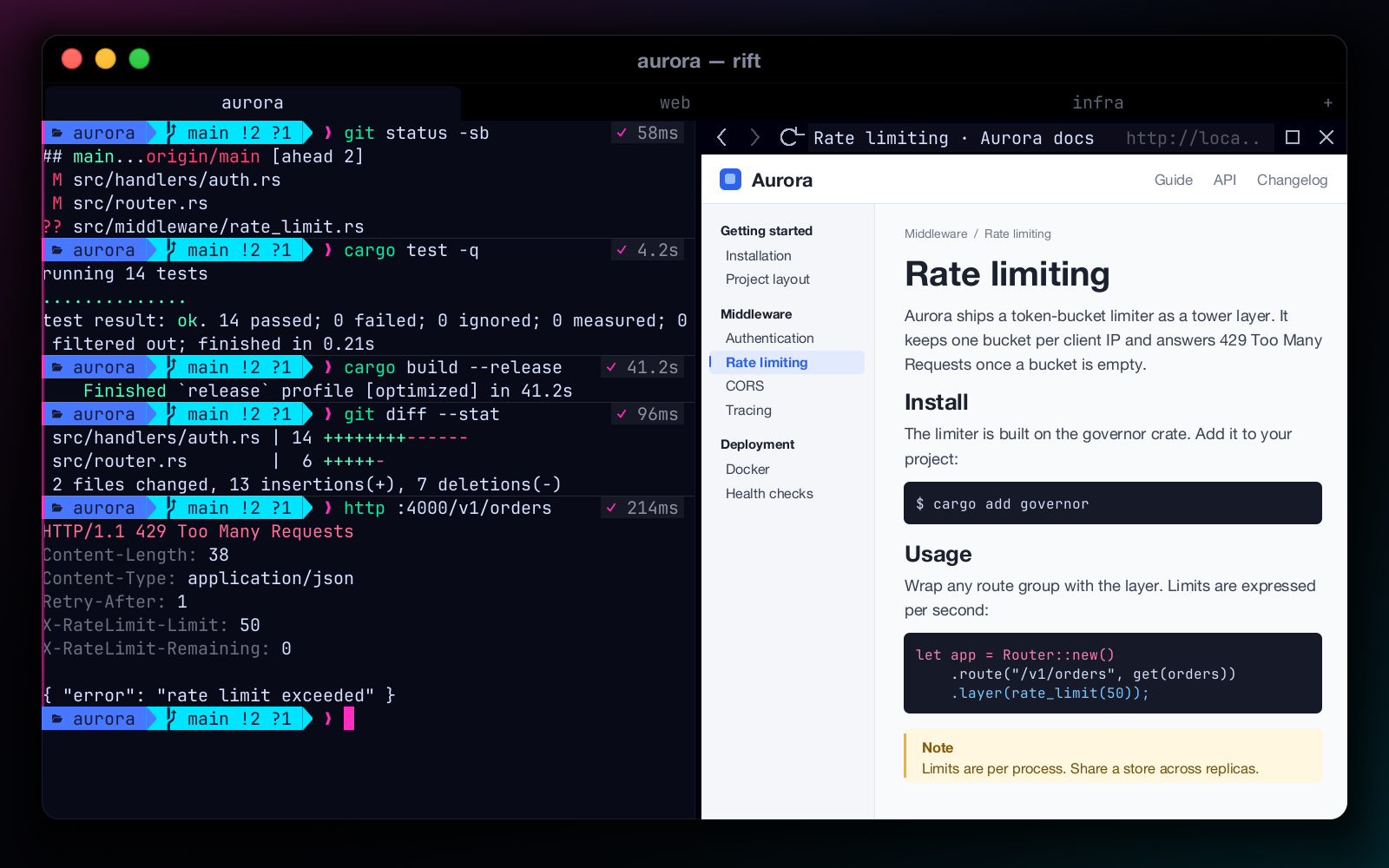
Built-in browser panel docked beside the terminal with back, forward, reload and an address bar

Built-in browser

A resizable docked web panel with a real toolbar and smart URL-or-search address bar. ⌘-click a link to open it inside Rift.

Rift with the CRT effect: curved screen, scanlines and soft phosphor glow

Cyber identity

Six effects — CRT, Neon Glow, Matrix Rain, Hologram, Glitch, Amber — plus the flagship rift-neon theme and nine more.

HUD strip showing CPU, memory, disk, git branch and uptime

HUD & power tools

A heads-up status strip and a toolbox you would otherwise install separately.

The toolbox

  • SSH manager
  • Time Warp (rewind the screen)
  • Git panel
  • Docker panel
  • CI/CD panel
  • Port dashboard
  • Regex playground
  • History search ⌘Y
  • asciinema recording
  • Secret masking
  • Inline images (Kitty protocol)
  • Broadcast input
  • Compare pane output
  • File manager
  • Command heatmap
  • Audit log

The core

  • Damage-tracked rendering
  • Optional wgpu GPU path
  • IME (Chinese input)
  • Nerd Font / Powerline / CJK fallback
  • Shell integration (OSC 133 / OSC 7)
  • Smooth scrolling
  • Rich selection
  • Context menu

// agents · new in 0.4.0

Mission control for your AI coding agents.

Mission Control dock

Run Claude Code, Codex CLI, Gemini CLI, opencode, Aider or Cursor CLI in any pane. Rift notices them, tracks what each one is doing across every tab, and tells you when one needs you.

  • One card per agent: repo and branch, state, model, tokens, cost, context use and a turn timeline
  • Answer approval prompts right on the card with 1 2 3 — the agent's own options; risky commands are flagged, critical ones need a second press
  • Interrupt, reply, broadcast, review or restart without switching panes
  • ⌘⇧; toggle the dock · ⌘⇧. jump to the next agent that needs you
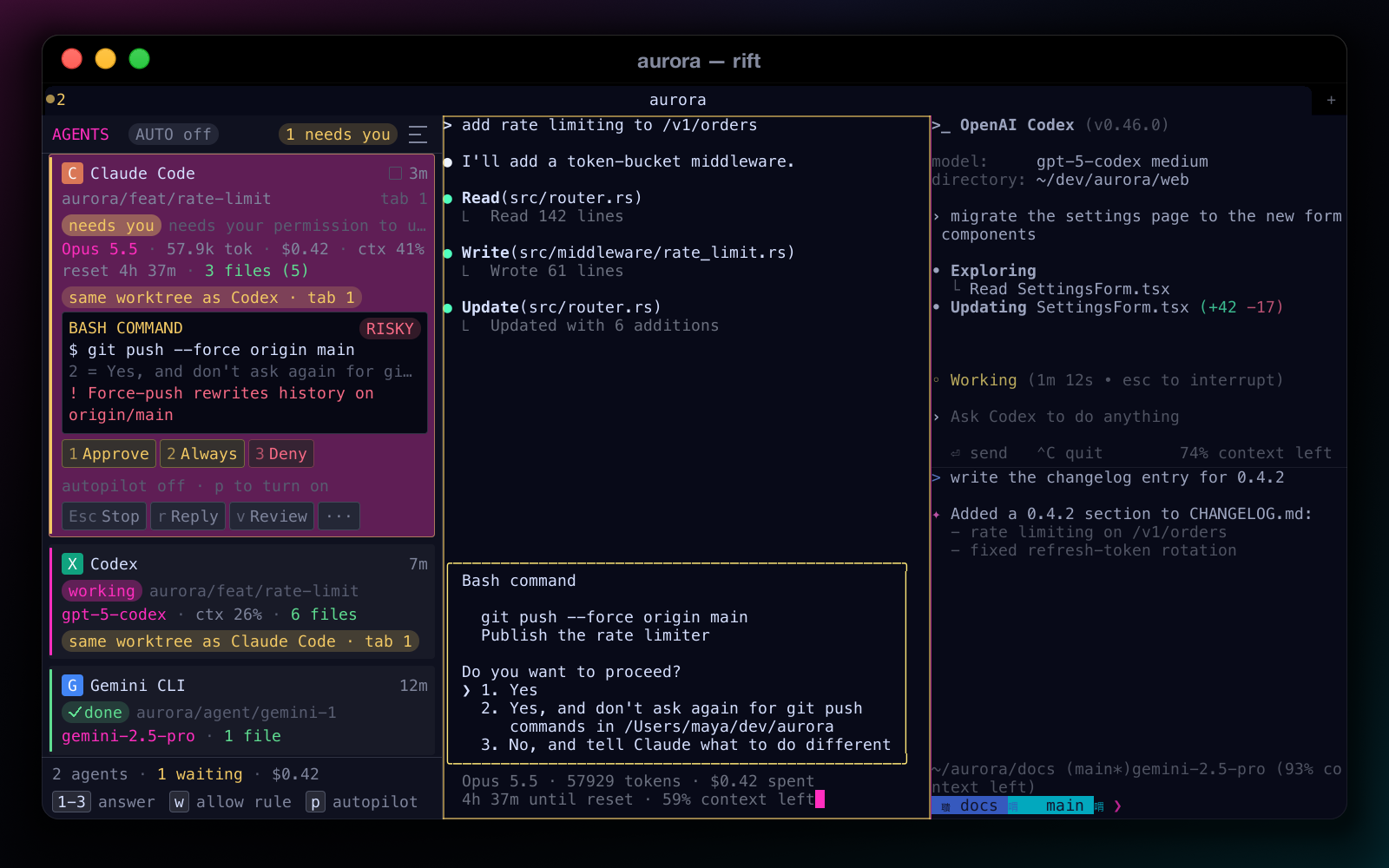
The Mission Control dock on the left with cards for Claude Code, Codex and Gemini CLI; the Claude Code card needs you and shows a risky git push --force request with Approve, Always and Deny buttons

Autopilot & approval policy

Stop babysitting routine prompts. With autopilot on, Rift answers an agent's prompt when your policy says it's routine — after a short, visible countdown you can cancel with Esc. It's off by default, per agent or for all of them.

  • Rules in ~/.config/rift/policy.toml, plus a repo's .rift/policy.toml once you trust it
  • Critical commands are never auto-approved. From an agent's pane they're answered No and you're notified; from an MCP client you get the critical confirm dialog, with Deny as the default
  • Protected paths and anything outside the repo always ask
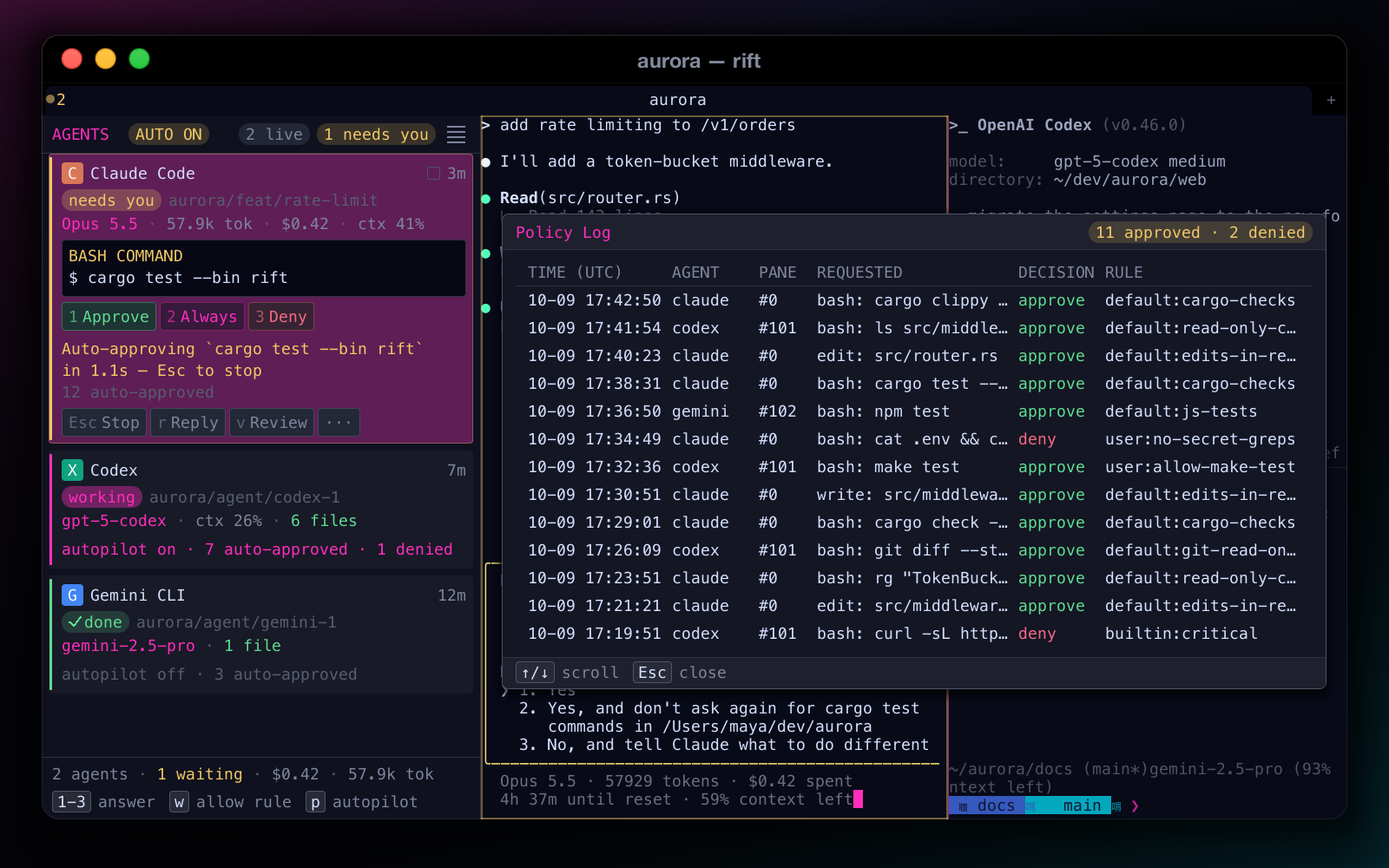
  • Every automatic decision lands in a policy log you can read
Autopilot counting down to approve cargo test on a Claude Code card, with the Policy Log overlay listing approved and denied requests and the rule that decided each
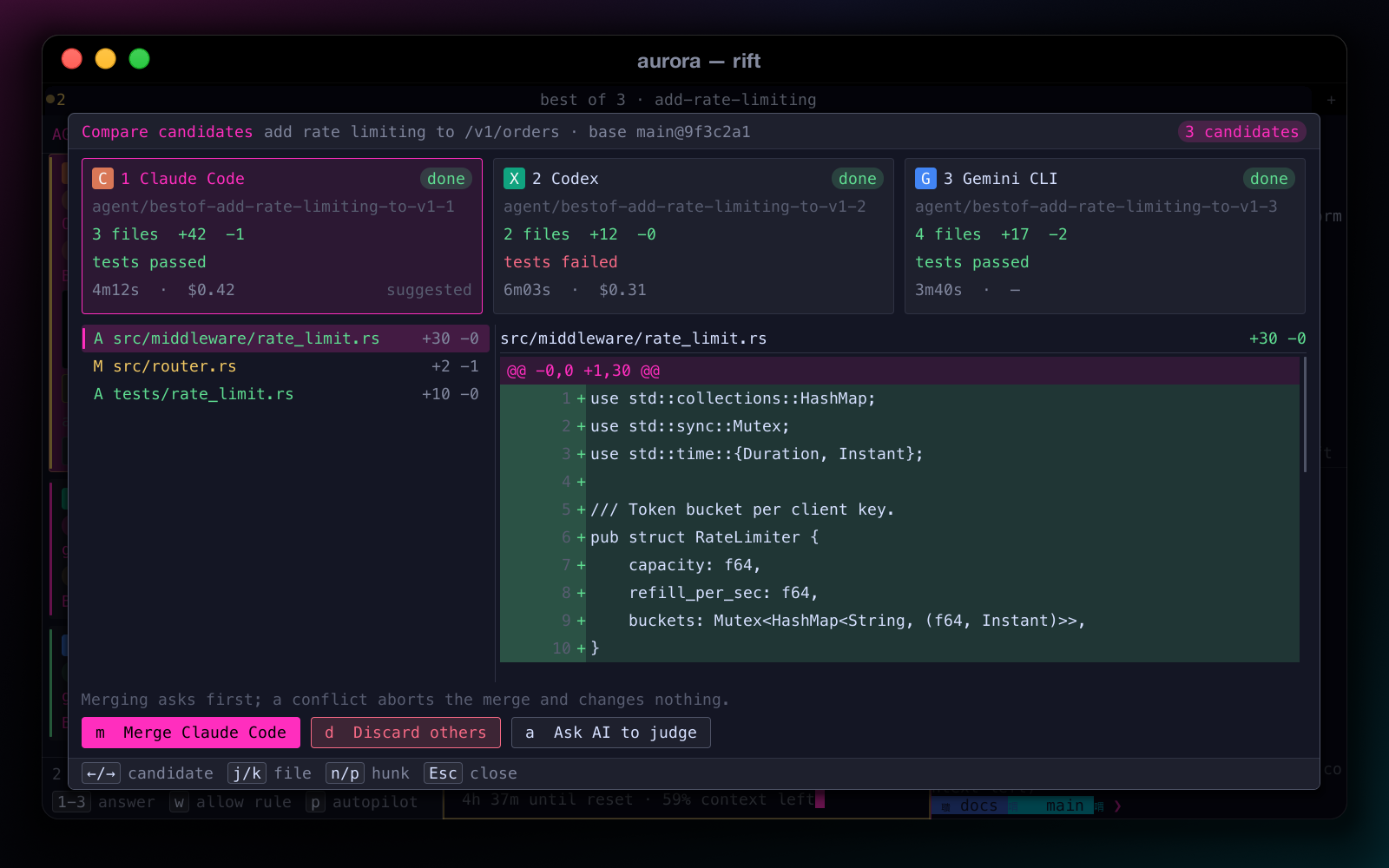
Compare candidates view for a best-of-3 run: Claude Code, Codex and Gemini CLI cards with files changed, test results, duration and cost, a diff below, and Merge, Discard others and Ask AI to judge buttons

Best of N

Give one task to 2–4 agents, each in its own git worktree. Compare diffs, test results, time and cost side by side, then merge the winner and discard the rest.

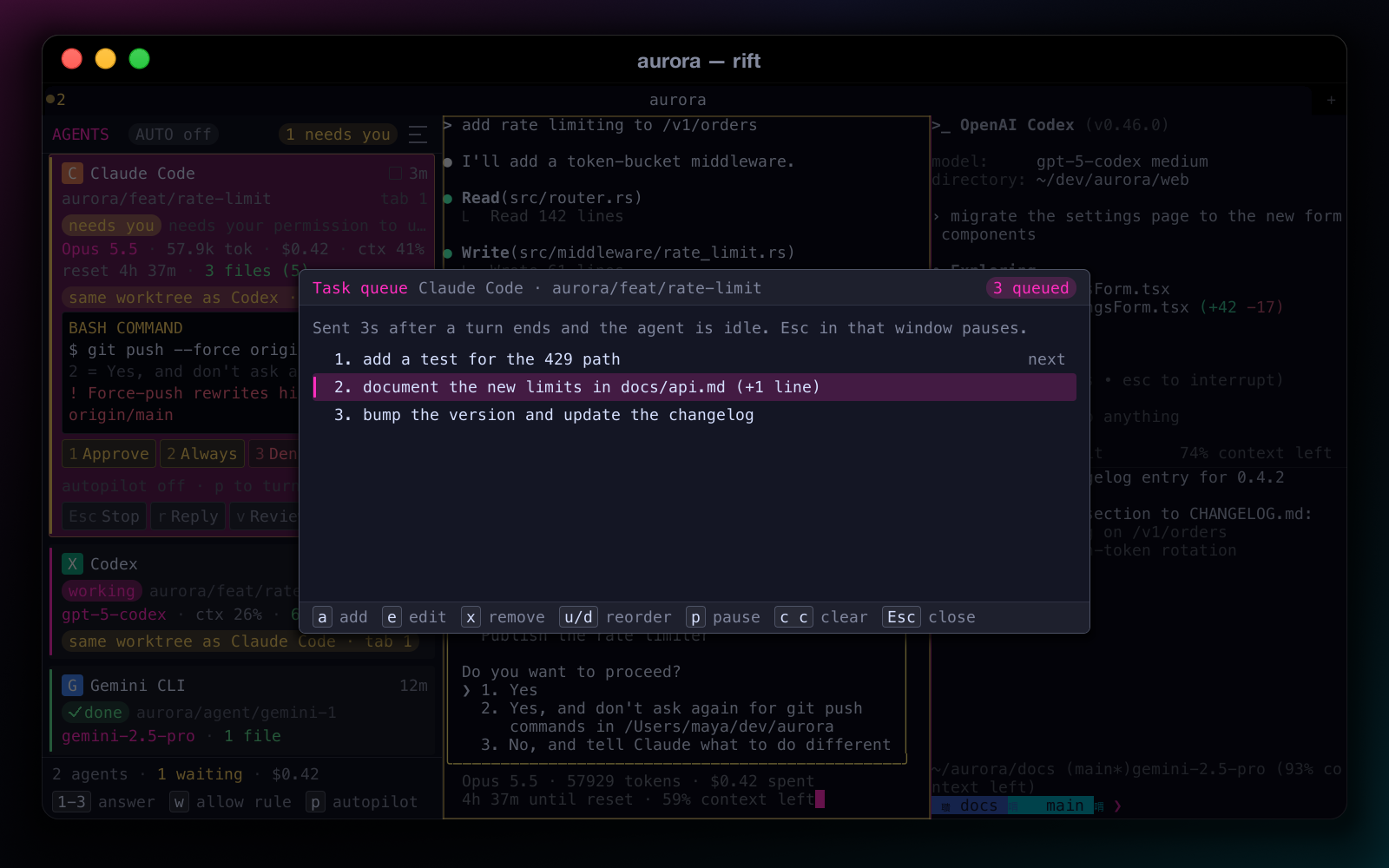
Task queue overlay for a Claude Code agent with three queued tasks and keys to add, edit, remove, reorder and pause

Task queues

Line up the next tasks for an agent. Each one is sent when the agent goes idle, after a 3-second countdown you can cancel. Queues survive a restart.

More for agents

  • Write & Review — a second agent reviews every turn; forward its verdict with f
  • Fix failing tests — loops test failures back to the agent until they pass
  • workflows.toml — your own templates with {task}, {branch}, {cwd}
  • Change review — per-turn checkpoints, diff and one-click revert with ⌘⇧J; never touches your index or branches
  • MCP server — claude mcp add rift -- rift mcp; agents read your panes and run commands only with your approval
  • New Agent — start one in a fresh git worktree, or a 2×2 grid of them

// compare

Why Rift?

Honest comparison. Rift is young; the others are excellent and far more mature. Pick Rift if the combination below is what you want.

FeatureRiftGhosttyWarpiTerm2
Open source✓ MIT✓ MIT✗✓ GPL
Native app✓ Rust✓ Zig✓ Rust✓ Obj‑C
GPU rendering◐ optional (wgpu)✓✓✓ Metal
No account required✓✓◐ for AI features✓
Command blocks✓✗✓◐ marks
Built-in AI chat / NL → command◐ preview✗✓◐ plugin
Bring your own key / local models✓ incl. Ollama—◐◐ plugin
Dangerous-command preview✓✗✗✗
AI agent mission control✓ dock + autopilot✗◐ own agents✗
Built-in browser panel✓✗✗◐
Screen effects / shaders✓ 6 built in✓ custom shaders✗✗
PlatformsmacOS, LinuxmacOS, LinuxmacOS, Linux, WindowsmacOS
MaturityEarly (v0.4)StableStableVery mature

✓ yes · ◐ partial / in progress · ✗ no. Based on our reading of each project's public docs as of 2026; things move fast — corrections welcome.

// shortcuts

Keyboard cheat sheet

macOS bindings shown. On Linux, ⌘⇧ shortcuts use Ctrl+Shift.

Essentials

⌘P
Command palette
⌘K
Ask AI about this
⌘⇧A
AI chat sidebar
⌘⇧;
Agent Mission Control
⌘⇧.
Next agent that needs you
Tab
Accept fix suggestion
⌘Y
History search
⌘F
Find in scrollback
⌘.
Autocomplete (⌃Space at a shell prompt)
⌘,
Preferences

Blocks

⌘⇧↑ ⌘⇧↓
Previous / next block
⌘⇧C
Copy block output
⌘C
Copy selected block / selection

Windows & tabs

⌘N
New window
⌥⌘W
Close window
⌘⇧T
New tab
⌘⇧W
Close tab
⌘⇧[ ⌘⇧]
Previous / next tab
⌃Tab
Cycle tabs

Panes

⌘D
Split right
⌘⇧D
Split down
⌘W
Close pane
⌘⇧↩
Zoom pane
⌃⌘=
Equalize
⌘[ ⌘]
Previous / next pane
⌥⌘+arrow
Focus pane in direction
⌃⌘+arrow
Resize pane
⇧⌃⌘+arrow
Swap pane

Tools

⌘⇧B
Browser panel
⌘⇧J
Change review
⌘⇧S
SSH manager
⌘⇧H
HUD
⌃⇧Z
Time Warp
⌘⇧G
Git panel
⌘⇧O
Docker panel
⌘⇧R
Record session
⌃⇧1…6
Effects (⌃⇧0 off)

Full list: README → Keyboard shortcuts, or search anything in ⌘P.

// install

Quickstart

Download Rift-0.4.0-macos.dmg (or the Linux .tar.gz) from GitHub Releases, or build from source with a stable Rust toolchain.

  1. Clone and build with GPU rendering and the built-in browser.
  2. Run it. Shell integration for zsh, bash and fish is injected automatically.
  3. On macOS, optionally wrap it into Rift.app.

Feature flags: gpu (wgpu renderer + GPU effects), webview (built-in browser; uses the system WebView — WebKitGTK on Linux), plugins (experimental WASM plugins).

# build from source
git clone https://github.com/overkazaf/rift.git
cd rift
cargo build --release --features gpu,webview
./target/release/rift
# macOS: create target/Rift.app
./scripts/bundle_macos.sh
open target/Rift.app

// ai setup

Bring your own model

Edit ~/.config/rift/config.toml. Any OpenAI-compatible endpoint works; Ollama runs entirely on your machine.

If api_key is omitted, Rift reads $DEEPSEEK_API_KEY or $OPENAI_API_KEY from the environment — so the key never has to live in a file.

Turn individual features off under [ai], or from the AI menu / palette at any time.

[llm]
provider = "openai"          # any OpenAI-compatible API
model    = "deepseek-chat"
api_url  = "https://api.deepseek.com"
# api_key from $DEEPSEEK_API_KEY

[ai]
auto_fix = true              # inline fix on failed commands
nl_hash  = true              # "# ..." at the prompt → command

// privacy

Local-first, by design

  • No account, no telemetry. Rift doesn't phone home.
  • Your key, your provider. AI requests go straight from your machine to the endpoint you configure — or nowhere, with Ollama.
  • Context only when you ask. Screen or block text is sent only for the AI action you trigger (and for auto-fix on failed commands, which you can turn off).
  • Observer stays home. Opt-in, stored under ~/.config/rift/observer/, skips sensitive commands and never records arguments.
  • Consent first. Cloud AI stays off until you answer a one-time prompt; a key in your environment alone never enables it, and secrets are redacted before anything is sent.
  • Clipboard is yours. Programs can't read it: OSC 52 reads are blocked by default, and writes are size-capped and announced.
  • SSH host keys are checked. Hosts are verified against ~/.ssh/known_hosts; unknown hosts ask first and changed keys are flagged.
  • Secret masking. API keys and tokens on screen can be masked with ⌘⇧M.

// faq

FAQ

Is Rift ready to be my daily driver?

The terminal core — rendering, splits, tabs, blocks, shell integration, session restore — is the most solid part of Rift. The AI features are in active development and marked preview. Expect rough edges and please file issues.

Do I need an AI key to use it?

No. Without a model configured, Rift is simply a fast terminal with blocks and tools. Add Ollama for fully offline AI, or a DeepSeek/OpenAI key when you want it.

Will AI ever run a command on its own?

Rift's own AI never does: generated and suggested commands are typed into your prompt for review, and you press Enter. Dangerous commands additionally go through Preview-Then-Accept. For coding agents, autopilot can answer routine prompts for you — but only if you turn it on, only when your policy approves the request, and never for critical commands.

Which coding agents does Mission Control support?

Claude Code, Codex CLI, Gemini CLI, opencode, Aider and Cursor CLI are detected automatically. For exact state tracking, point Claude Code hooks or Codex notify at rift agent-event — see the README.

Does it modify my .zshrc / .bashrc?

No. Hooks are injected at launch (ZDOTDIR for zsh, --rcfile for bash, --init-command for fish) and your own config is sourced first.

Which platforms are supported?

macOS is the primary target. Linux builds; it gets less testing today. Windows is not supported yet.

Nerd Font icons show as blank boxes.

Rift falls back through Nerd Font, Powerline and CJK fonts it finds on your system. If icons are still missing, set font_family = "MesloLGS NF" (or another Nerd Font) under [general].

Why are effects on ⌃⇧ and not ⌘⇧?

macOS reserves ⌘⇧3–⌘⇧5 for screenshots, so effects live on ⌃⇧1–⌃⇧6 and in View → Effects.

Built by one person, in the open.

If Rift saves you time, a star helps people find it and a coffee keeps the AI bills paid.